
Cold email is one of the most effective ways to generate leads — but only if it feels personal. Most recipients can instantly recognize a mass-blasted message, and those are usually ignored or deleted. The real challenge? Writing personalized emails at scale.
This is where Clay AI stands out. Clay makes it possible to automatically research each prospect and create relevant, personalized email lines by pulling data from multiple sources — like websites, LinkedIn, and tech stack tools. Instead of writing every email by hand, you can engineer prompts that tell Clay exactly what to extract, and how to phrase it in a way that feels human.
The result: cold emails that feel like you wrote them one-by-one — without actually doing that.
Using my affiliate link, you’ll get 1,000 free Clay AI credits to create your first personalized AI copy — or simply experiment and learn how Clay AI works. Click here to get Clay AI credits.
🚀 How Clay AI Should Work for Cold Email
Clay is not used to write the entire email.
Clay is used for data extraction + sentence personalization.
Clay should only produce:
✔ 1–2 personalization sentences
✔ pulled from real data (website, product pages, keywords, etc.)
✔ following tight formatting rules
✔ never robotic
✔ never generic
✔ never hallucinated
💡 CLAY AGENT #1 — “What They Do & For Who”
Prompt in Clay:
Analyze website: {{domain}}.
Identify:
- Who their target customers are (in 2–3 words)
- What they help them achieve (in 2–4 words)

Write this exact sentence:

"I saw you're helping {{customer}} with {{outcome}} at {{companyName}}."

Rules:
- max 14 words
- US conversational English
- only write the sentence
Example Output:
I saw you're helping local homeowners with exterior renovation at Redwood Build Co.
(No names mentioned — just company layer)
💡 CLAY AGENT #2 — “Why Their Work Is Long-Term”
Prompt in Clay:
Look at {{domain}} and identify something their customers want that takes long-term effort.

Write:

"Since {{goal}} takes long-term commitment, I thought this might be valuable for you."

Rules:
- max 15 words
- only write the sentence
Example Output:
Since maintaining structural reliability takes long-term commitment, I thought this might be valuable for you.
💡 CLAY AGENT #3 — “Industry Identity Normalizer”
Prompt in Clay:
Analyze the business at {{domain}}.
Identify the type of company in 1–3 words.

Write:

"You're one of the {{industryType}} we've been studying closely."

Rules:
- max 12 words
- only output the sentence
Example Output:
You're one of the residential construction firms we've been studying closely.
🧠 Why this works
When your email starts like this:
I saw you're helping local homeowners with exterior renovation at Redwood Build Co.
Since maintaining structural reliability takes long-term commitment, I thought this might be valuable for you.
You're one of the residential construction firms we've been studying closely.
The recipient FEELS:
✔ This person knows what we do
✔ This is not a bulk email
✔ This is not AI fluff
✔ This is relevant to my business
📩 Example FULL Email (generic & reusable)
{{sentence_1}}
{{sentence_2}}
{{sentence_3}}

We build outbound systems that bring a steady flow of qualified opportunities from companies actively looking for your service — without relying on ads or inbound traffic.

The outreach messaging is fully personalized, the deliverability is optimized, and you only interact with prospects who respond with real interest.

If you're open to it, I’d be happy to share a short demonstration of how the system works.

Would you like that?
No names
No identity references
Just benefits + clarity
🔥 UNIQUE CLAY AGENTS FOR DIFFERENT NICHE OUTPUT
I’m giving you original prompt packs for different industries — ALL UNIQUE.
A) Manufacturing Personalizer
Visit the product section of {{domain}}.
Extract the specific product category (2–4 words) they appear to specialize in.

Write:

"I noticed you specialize in {{productCategory}}, which caught my attention."
Example Output:
I noticed you specialize in precision machining, which caught my attention.
B) SaaS Platform Personalizer
Scan {{domain}}.
Identify the core function of their software in 2–4 words.

Write:

"Looks like your platform focuses on {{platformFunction}}, which is interesting."
Example Output:
Looks like your platform focuses on workforce automation, which is interesting.
C) E-commerce Personalizer
Analyze {{domain}}.
Find the top-selling product category (2–4 words).
Write:

"I see your store is gaining traction with {{productCategory}}."
Example Output:
I see your store is gaining traction with handmade skincare items.
🎯 FINAL OUTPUT STRUCTURE
Clay outputs:
sentence_1
sentence_2
sentence_3
(optional niche-specific sentence)
You insert them into your email tool as:
{{sentence_1}}
{{sentence_2}}
{{sentence_3}}
...
🚫 The Rules that MUST NEVER be broken
❌ Clay does NOT write the whole email
❌ Clay does NOT guess or invent facts
❌ Clay does NOT use generic compliments
❌ Clay does NOT imitate GPT-writing style
❌ Clay does NOT add emojis
❌ Clay does NOT mention personal names
🧩 Your Unique Cold Email Building System
✔ Clay extracts context sentences
✔ You write the core pitch manually
✔ Deliverability stays high
✔ Replies are real and meaningful
✔ This works across every industry
Understanding Clay for Cold Emailing
Clay is a powerful data automation tool built for modern sales teams. It connects to hundreds of data sources — like LinkedIn, company websites, CRMs, and enrichment tools — and lets you build workflows to personalize outreach at scale.
In the context of cold email, Clay lets you:
- Pull live data on each prospect (e.g. role, company info, tools used)
- Run AI prompts over that data to generate customized lines
- Combine multiple sources (e.g. LinkedIn + website + job change) to build highly relevant messages
For example, you can set up a prompt like:
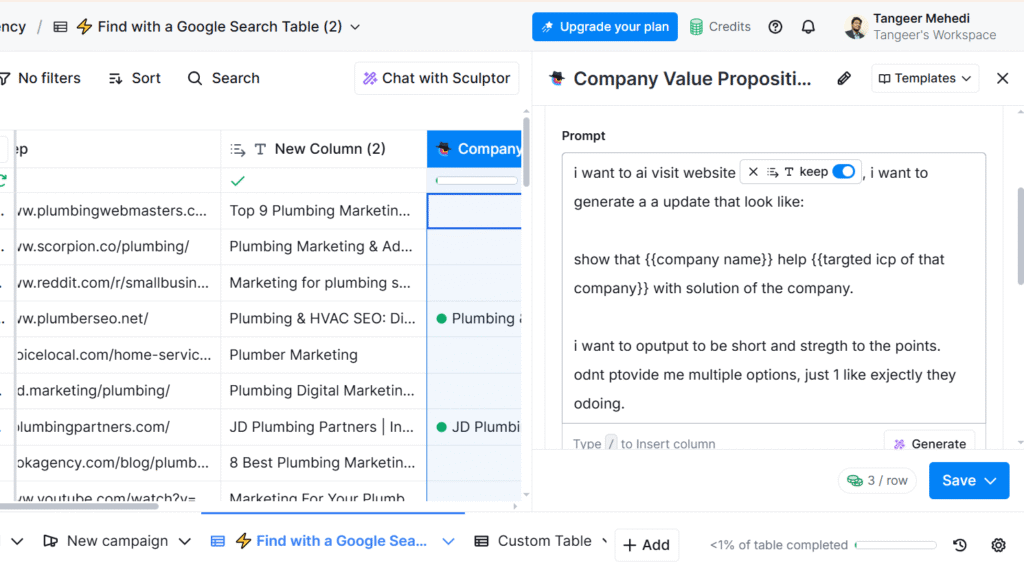
“Visit {{company website}}, extract what they do, and generate a line that compliments their value proposition for {{ICP}}.”
This allows your email to start with a line that shows genuine familiarity — without you manually researching each lead.
Clay’s biggest advantage is flexibility: you’re not limited to static fields. You can stack enrichment, logic, and AI to write different messages depending on the persona, company size, or industry.
It’s not just faster — it’s smarter outreach that adapts to your targets.
Prompt 1: Personalize Using Company Website Content
Prompt Overview
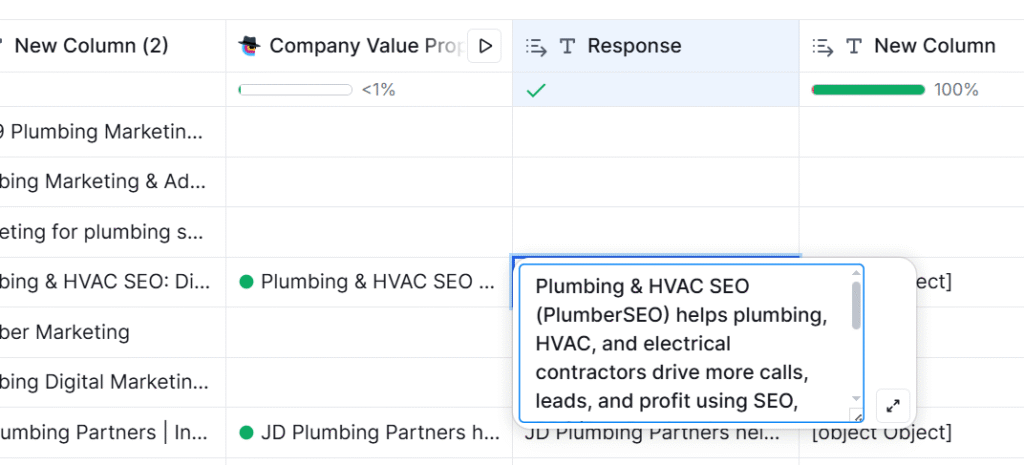
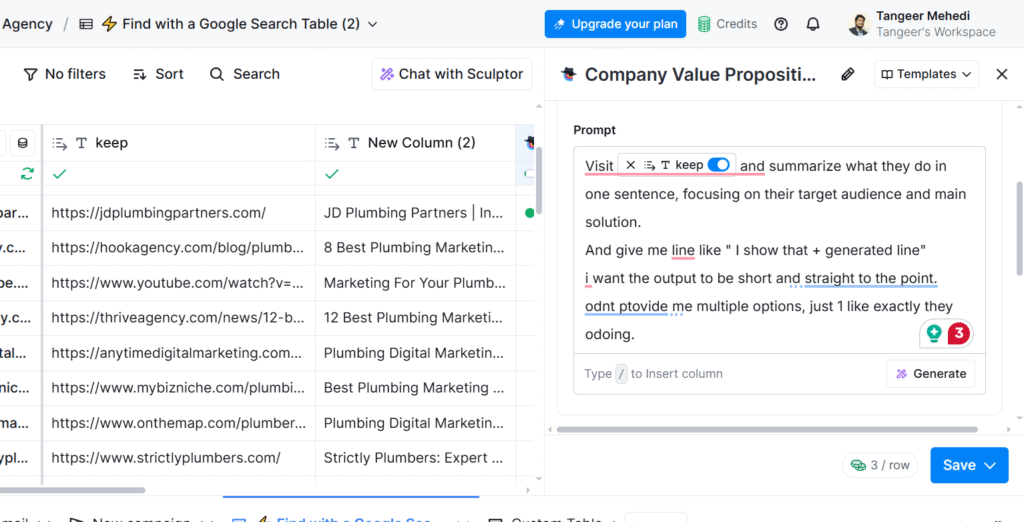
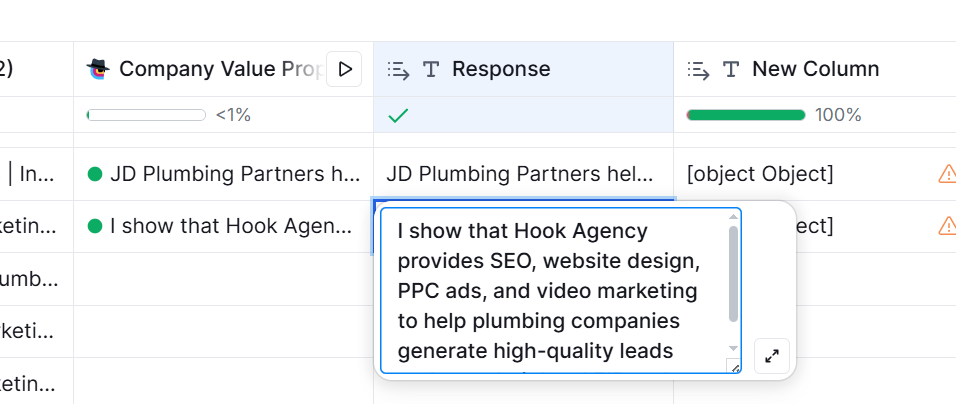
Use a prompt that visits the homepage of the target company and asks Clay AI to extract the ICP (ideal customer profile) and the problem they solve. Then, generate a sentence that reflects that understanding.
Example Prompt
“Visit {{company.website}} and summarize what they do in one sentence, focusing on their target audience and main solution.”
Example Output
“I saw that Bluecore helps eCommerce brands increase repeat purchases using predictive automation.”
Prompt 2: Personalize Using LinkedIn Bio or Headline
Prompt Overview
Set up Clay to fetch the person’s LinkedIn headline or summary and create a compliment or relevance line based on it.
Example Prompt
“Pull {{LinkedIn headline}} and write a short sentence that acknowledges their role or focus.”
Example Output
“Saw you’re leading partnerships at Stripe — must be exciting to work on global fintech deals.”
Prompt 3: Personalize Using Recent LinkedIn Activity
Prompt Overview
Pull the prospect’s latest LinkedIn post (or article title), then generate a response or compliment that relates to the content.
Example Prompt
“Go to this LinkedIn profile: {{linkedin_url}}. Find their most recent post. Write a short, genuine, one-sentence reply that clearly shows I read and appreciated what they said.”
Example Output
“Loved your recent post about improving sales processes — your insight on simplifying messaging really resonated.”
Prompt 4: Personalize Based on Tools/Tech Stack
Prompt Overview
Pull a list of known tools used by the company and generate a sentence that ties your solution to one of those tools.
Example Prompt
“Find what tools {{company name}} is using (e.g., Salesforce, HubSpot). Write a one-line question or insight related to that tool.”
Example Output
“Noticed you’re using HubSpot — curious how you’re handling lead scoring within your current setup.”
Prompt 5: Personalize Based on Job Changes
Prompt Overview
Detect if the contact has recently changed roles or companies, then write a message that acknowledges the move and ties it to your value prop.
Example Prompt
“Check if {{first name}} started a new role within the last 90 days. If yes, generate a short congratulatory line and relate it to their likely goals in this new role.”
Example Output
“Congrats on the new Head of Marketing role at Growlytics — sounds like a big opportunity to scale brand reach fast.”
Prompt 6: Personalize Using Common Connections or Networks
Prompt Overview
Detect any mutual LinkedIn connections, alumni groups, or accelerators, then generate a message that references that connection.
Example Prompt
“Check if {{first name}} shares any mutual LinkedIn connections, alma mater, or is part of known startup networks. Write a one-line connection opener based on that.”
Example Output
“Noticed we’re both connected to Sarah from DemandWell — always great to meet others in her circle.”
Prompt 7: Personalize Based on Company Growth or Hiring Trends
Prompt Overview
Use company enrichment to detect growth signals (like hiring activity or recent funding) and generate a sentence that references the momentum.
Example Prompt
“Check if {{company name}} has recently hired 5+ roles or raised funding. Write a sentence that compliments their growth and transitions into a conversation.”
Example Output
“Saw you’re hiring across GTM and product — sounds like big moves ahead at Novalane.”
Prompt 8: Personalize Based on Website Blog or News Section
Prompt Overview
Pull the most recent blog title or press mention from the company’s website, then generate a relevant comment or question around it.
Example Prompt
“Visit {{company.website}}, scan the blog or news section, and write a one-line compliment or insight on their latest post or announcement.”
Example Output
“Read your latest post on AI-driven customer success — really sharp take on proactive retention strategies.”
Prompt 9: Personalize Using Social Proof (Clients or Testimonials)
Prompt Overview
Extract known client logos or testimonials and generate a sentence that compliments or builds relevance based on those companies.
Example Prompt
“Visit {{company.website}} and extract any mentioned clients or testimonials. Write a short line that compliments their work with those companies.”
Example Output
“Impressive to see you’re working with Slack and Brex — definitely shows the kind of impact your team is making.”
Prompt 10: Personalize Based on Website Visuals or Unique Features
Prompt Overview
Use Clay to identify a standout visual or messaging element, and write a casual, genuine compliment around it.
Example Prompt
“Visit {{company.website}} and identify a unique visual or feature (e.g., 3D graphics, product demo, bold CTA). Write a short line that compliments it.”
Example Output
“Loved the 3D animation on your homepage — makes your brand instantly memorable.”
Building the Full Cold Email Using These Prompts
Once you have multiple personalized data points — like company description, recent LinkedIn post, tech stack, or hiring activity — you can combine them into a cold email that reads like it was written 1-on-1.
Example Email
Subject: Quick idea for {{company name}}
Hey {{first name}},
Saw that {{company name}} helps {{ICP}} with {{solution}} — love how clearly your site communicates that.
Also noticed you’re hiring across GTM — congrats on the growth. When teams scale this fast, we often see X problem pop up.
We help companies like {{similar client}} solve that using {{your product}}. Worth a quick chat this week?
– [Your Name]
Conclusion
Cold email personalization doesn’t have to be slow or manual. With Clay AI, you can build smart, flexible workflows that combine live data, AI-generated insights, and scalable prompts — allowing you to craft messages that feel human, not robotic.
By using any of the 10 prompt ideas in this post, you can turn simple data points into conversations that convert. Start small: test one or two prompts in your workflow, measure replies, and improve from there.
When done right, Clay lets you write cold emails that don’t feel cold at all.
If you need cold email done properly, I can manage the full setup and write personalized copy for you — you only talk to the prospects who reply. Contact Me.

Hi, I’m Md Tangeer Mehedi — a Cold Email Outreach Specialist. I help B2B brands attract new leads and clients with proven outreach strategies. My focus is on appointment setting and building cold email systems that deliver consistent results.